Why Your SSH Connection Keeps Dropping (and How to Keep It Alive)
You connect to your server, do some work, go make coffee, and come back to a terminal that has quietly died. You type and nothing appears. Nothing about your internet was broken while you were gone. This is one of the most common frustrations in server work, and once you know what causes it, it takes about two minutes to fix permanently.
First, notice the pattern
The symptom is specific, and the specificity is the clue. Ask yourself whether this describes what you see:
- The connection dies after you have been idle, not in the middle of active work.
- The window looks perfectly normal until you press a key — then nothing echoes back.
- It hangs for a while before finally admitting the connection is broken.
- Reconnecting works instantly, proving the server and network are both fine.
- It happens on some networks — an office, a café, a phone hotspot — and rarely on others.
If that is your situation, your internet is not unreliable. Something deliberately closed an idle connection.
What is actually happening
Your connection to the server does not travel as a single unbroken wire. It passes through a series of devices — your home router, your company's firewall, your ISP's equipment, your mobile carrier's network, the server's own provider. Several of them keep a table of the connections currently flowing through them.
Those tables are finite, so entries that look abandoned get removed. When a connection sends nothing at all for a few minutes, one of those devices decides it is finished and drops its entry.
The cruel part is that nobody is informed. Your computer still believes it has a connection. The server still believes it has a connection. The path between them has been quietly demolished. Everything looks fine right up until you type something, and the first thing you send disappears into a route that no longer exists.
That is why the failure feels so strange: the freeze happens at the moment you resume, but the connection actually died minutes earlier, while you were away.
Why an office network is often the worst offender. Corporate firewalls tend to be the most aggressive about reclaiming idle connections, and timeouts of a few minutes are common. Mobile hotspots are a close second. If your connections survive at home but not at work, you have found your culprit — and the fix below works regardless of which device is responsible.
The fix: never be completely silent
Since connections get dropped for looking abandoned, the solution is to stop looking abandoned. A keepalive sends a tiny message through the connection at a regular interval — often once a minute. It carries no real content and does not disturb your terminal in any way. Its only job is to be traffic.
Every device along the path sees activity, marks the connection as alive, and keeps its table entry. Your session survives a coffee break, a meeting, or an afternoon.
The cost is negligible: a handful of bytes per minute, which is far less than a single keystroke's worth of screen output.
Where this is handled in TurboSSH. Keepalives are on by default for every connection — terminal sessions and port-forwarding tunnels alike — with a message sent about once a minute. There is no setting to find and no configuration file to edit. Long-lived tunnels also get an additional benefit, described further down.
If you use the command line instead
The same behavior can be configured once in your SSH configuration file, so it applies to every connection you make. On Windows this file lives at C:\Users\YourName\.ssh\config; on macOS and Linux, at ~/.ssh/config.
Host *
    ServerAliveInterval 60
    ServerAliveCountMax 3
This says: send a keepalive every 60 seconds, and if three of them in a row go unanswered, conclude the connection is genuinely gone and give up. That combination keeps sessions alive across ordinary idle time while still noticing a real failure within a few minutes, instead of hanging indefinitely.
The other half of the problem
Keepalives solve the idle-timeout problem completely. There is a second, related frustration they cannot help with, and it is worth being clear about the difference because people often reach for the wrong tool.
Suppose you start something genuinely long — a large backup, a database migration, a build that takes forty minutes. Then your laptop sleeps, or you switch networks, or you simply need to leave. When the connection ends, everything you started inside that session ends with it. You come back to a job that stopped two-thirds of the way through.
No keepalive setting prevents this, because the problem is not the connection timing out. The problem is that your work was tied to the connection's lifetime in the first place.
The answer: let the work outlive the session
The standard solution is a terminal multiplexer — tmux or screen. These run on the server and hold your work in a session that belongs to the server, not to your connection. You attach to it, work, and detach; the session keeps running whether you are connected or not.
# Start a named session on the server
tmux new -s backup

# Run whatever needs to run, then detach:
#   press Ctrl-b, release, then press d

# Later — from anywhere, after any disconnect
tmux attach -t backup
Everything is exactly as you left it, still running. This is the habit that separates people who lose work to disconnects from people who do not, and it is worth building for anything you would be annoyed to restart.
| Symptom | Cause | Fix |
|---|---|---|
| Freezes after being idle, reconnect works fine | A device in the middle dropped an idle connection | Keepalives |
| Long-running job dies when you disconnect | The job was tied to the session's lifetime | tmux or screen |
| Disconnects during active use, on every network | Genuine network instability, or a server-side limit | Investigate the network and the server's logs |
| Server closes you out after a fixed period, always | A deliberate server-side idle policy | Server configuration — ask whoever administers it |
When tunnels drop and you never notice
There is a quieter version of this problem that catches people out. A port-forwarding tunnel — the kind that lets you reach a remote database from a local tool — has no screen output. Nothing visibly freezes. It simply stops working, and the next thing you learn is that your database tool has started reporting errors for reasons that appear to have nothing to do with SSH.
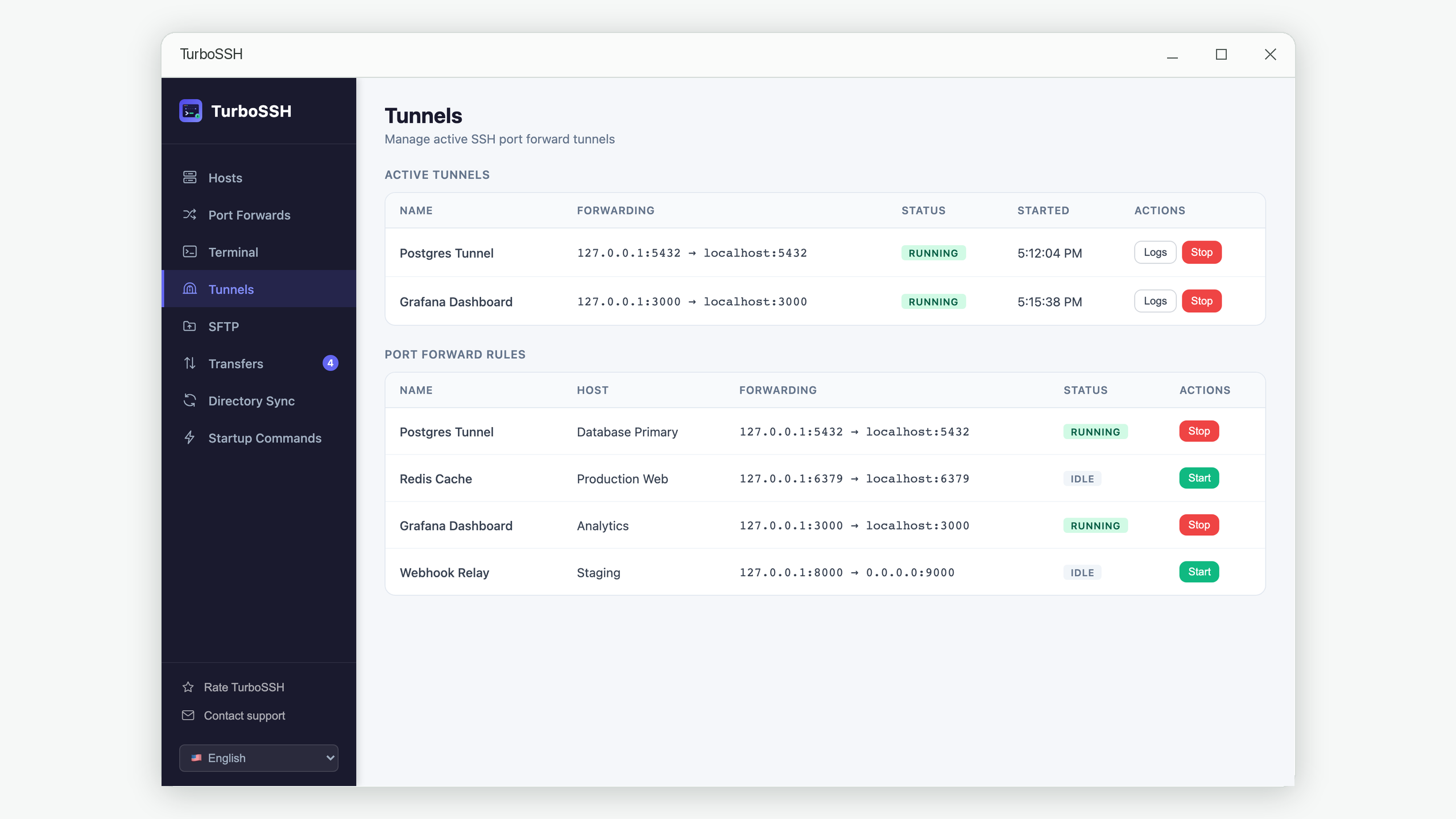
This is why TurboSSH watches its tunnels rather than assuming they are fine. Each running tunnel is checked periodically, and if the underlying connection has gone away, the tunnel is marked as stopped with the reason recorded in its log. You get to see that the tunnel died, instead of debugging your database client for twenty minutes first.
A useful diagnostic instinct. When something that talks to a remote server starts failing mysteriously, check whether the connection underneath it is still alive before you investigate the thing on top. It is the layer people skip, and it is often the answer.
A quick checklist
- Confirm it is an idle timeout Does it die specifically after quiet periods, with reconnects working immediately? Then it is a timeout, not a bad connection.
-
Make sure keepalives are on
Use a client that enables them by default, or add
ServerAliveInterval 60to your SSH config. - Run long jobs inside tmux Anything you would hate to restart should not depend on your connection staying up.
- Check your network if it persists If sessions still die during active use, on every network, the problem is genuinely elsewhere.
Frequently asked questions
Do keepalives make my connection less secure?
No. A keepalive is an ordinary message inside the existing encrypted connection. It contains no meaningful content and adds nothing new for an outsider to observe.
Should I set the interval much lower than 60 seconds?
Rarely worth it. Sixty seconds is comfortably below the timeout of nearly all network equipment. If you are on an unusually aggressive network, try 30 — but going lower mostly adds traffic without adding reliability.
Why does my session hang for a long time before admitting it is dead?
Because nothing told your computer the connection was gone. It keeps waiting for a reply that will never come until a timeout finally expires. Setting ServerAliveCountMax gives that wait a firm limit, so a dead connection is declared dead in a few minutes rather than eventually.
Can the server be the one closing my connection?
Yes. Some servers are deliberately configured to disconnect idle sessions as a policy. In that case your keepalives are working correctly and the server is choosing to end the session anyway — that one has to be changed on the server, by whoever administers it.
Will keepalives save a job that is already running when I disconnect?
No, and this is the important distinction. Keepalives prevent the disconnect from happening in the first place; they cannot rescue work once a session ends. For that you need tmux or screen, which detach the work from the session entirely.
In short
Idle SSH sessions do not die of natural causes. Something in the middle of the path removes a connection that has gone quiet, and neither end finds out until you try to use it. A keepalive every minute prevents this entirely, and running long jobs inside tmux makes the whole question irrelevant for the work that matters most.
Both fixes take a couple of minutes. Together they eliminate an annoyance most people simply learn to live with.
Connections that stay up on their own
TurboSSH enables keepalives by default for every session and tunnel, and watches running tunnels so a dropped one tells you instead of failing silently.
Get TurboSSH on Microsoft Store